The sentence heard most often in dashboard design meetings over the past year: “can’t AI just build this?” It is a fair question. Filling an empty page often takes longer than preparing the data behind it.
The cost is not invisible either. The first meeting with the business rarely happens over something concrete; it happens over the different dashboards everyone is picturing. Until the second meeting the designer works on guesswork, and the business changes its mind the moment it sees a first version.
What the chart draft is actually built from
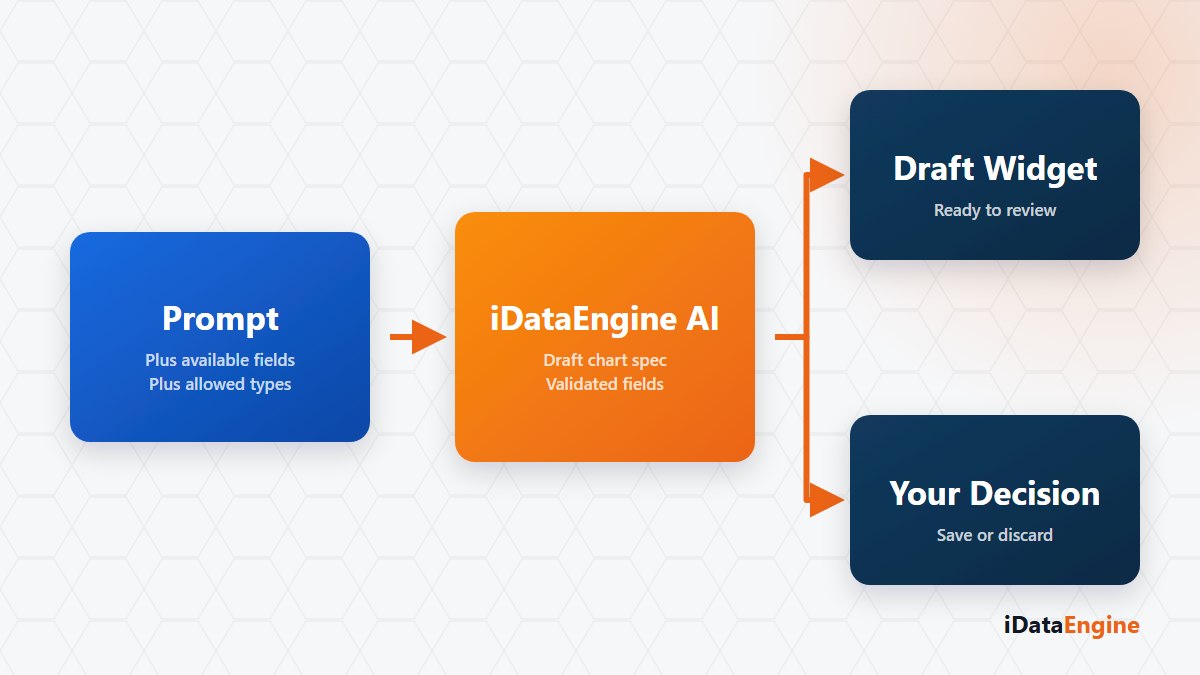
The assistant in BI Portal closes the empty page in three steps:
- Input. The natural-language prompt you write, the existing fields of the selected data object, and the conversation context.
- Generated output. A chart definition, or a page layout draft holding several widgets.
- Control. What comes back is not rendered straight to the screen. It is validated against permitted chart types, permitted aggregations and field names that genuinely exist. A dashboard draft is also checked for widget count and layout rules.
So what the assistant can propose is a chart or a page layout with a counterpart in your own data set. Asking it for a field that does not exist in that data set, and watching what comes back, is a practical way to test the boundary in your own environment.
Who saves the dashboard draft?
No draft is saved on its own. The output lands in the front end; saving it, editing it and publishing it are the user’s work. That distinction is not cosmetic. Measure selection, breakdown and formatting decide what the dashboard means to the business, and nothing validates those. Validation happens at field and type level, not at business-logic level.
Here is a comparison you can run yourself. Pick a data object whose numbers you already know, build the same chart twice — once by hand, once from a prompt — and read the total on both sides. When the two disagree, the place to look is usually not the model but the breakdown the measure was aggregated over, and that call still belongs to the designer.
Model keys and the daily call limit
These assistants do not run by themselves. They need a registered provider, an API key belonging to the user and a model selection; the verified path in the product runs over OpenRouter, and a key can carry an expiry date and a daily call limit. Two things follow. Which team uses the assistant, and how heavily, becomes visible — and the fact that the prompt and the field context travel to a provider outside the organisation stays on the table as a deliberate decision.
Try a small experiment in your next dashboard design meeting. Pick the data object already on the agenda, write the chart you want in a single sentence, and put the resulting draft next to the first proposal your team produced on an empty page. That comparison makes clear which decisions belong to a draft and which belong to a designer. If you want to run the session on your own data object, let us work out the scope together.