It starts innocently. Someone says “let us check the new rows in that table once a day”. The check joins a list, and nobody objects.
Six months later the list has seven items: was a transport released, did a role change, did an order status move, was a price updated. Each takes five minutes. Together they are the first hour of somebody’s day.
The threshold is not the length of the list. It is the week that person is on leave, when none of the checks happen — and nobody notices.
What an event trigger waits for
The way to shorten the list is turning a check into a definition. An event definition selects the SAP table and fields to watch and builds the change query; filter rows support include and exclude, operators, value ranges and dynamic dates. That is how a scope such as “only this sales organization, only the last seven days” gets drawn.
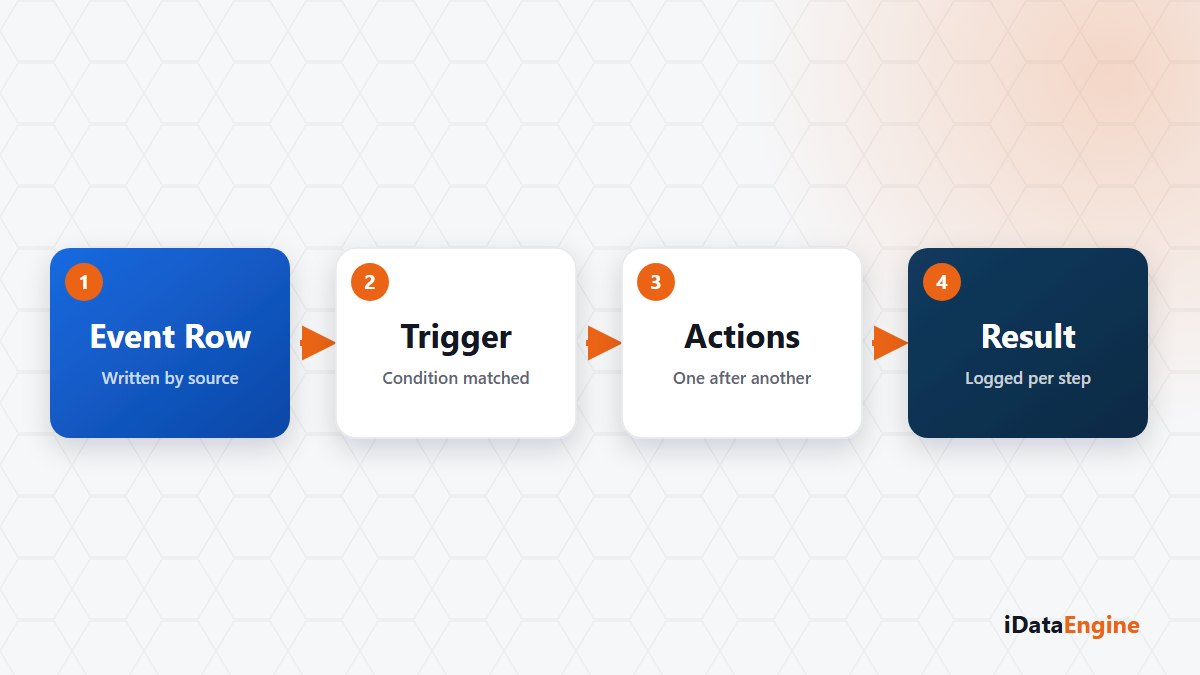
Three action targets work today: a mail template, a registered REST service call and an internal system job. Conditional triggers sit between event and action, and the condition is evaluated against the event row, its metadata and the event context.
Keep one expectation separate on the SAP job action: the handler validates the target and returns a queued result. That result does not show that the work finished on the SAP side.
Action order and the scan interval
Two boundaries decide whether your design holds. First, events do not arrive as instant notifications from SAP; they are scanned at defined intervals or triggered manually. The delay equals your scan interval. For an approval notice that is fine; for a reaction that stops a line, it is a distinction to settle with the business.
Second, triggers are processed one after another in the current dispatcher loop, not in parallel. A slow action at the front of the chain makes the rest wait, which turns “put the heavy REST call last” into a design decision.
Not processing the same row twice
In any scan-based design the real risk is repetition — reporting the same change on every pass. Pulled rows are compared against a hash built from the key fields you selected, and rows already processed are skipped. Deduplication accuracy depends directly on that key choice: pick it too broadly and you will miss real changes.
Test mode is the most valuable part of the setup. Data, findings and email content can be previewed before anything goes live, and seeing how many records match a broad filter is what makes you narrow the definition. Received events, executed actions, their states and the raw payload stay in the event log.
The most productive uses sit between control and notification: pulling the objects in a released transport request into the code analysis flow, or letting the right team know when roles and authorizations change. These are exactly the jobs nobody wants to watch continuously and which get expensive when missed.
This area is not a separate licensed module; it shares the mail, service and job infrastructure underneath. The practical upshot: setting up an event notification does not mean learning a new world.
The first task is not configuration but inventory: write down the checks your team performs by hand each morning. Pick one from that list and let us turn it into an event definition — you will also find out which of them can genuinely tolerate a delay.