The hard question in an audit meeting is not “does this control exist?” It does exist. The hard one comes right after: how do you show it?
Walking in unprepared rarely costs you a missing-control finding. It costs three people a week of hunting for evidence screen by screen. The control was in place; nobody remembered where it was recorded.
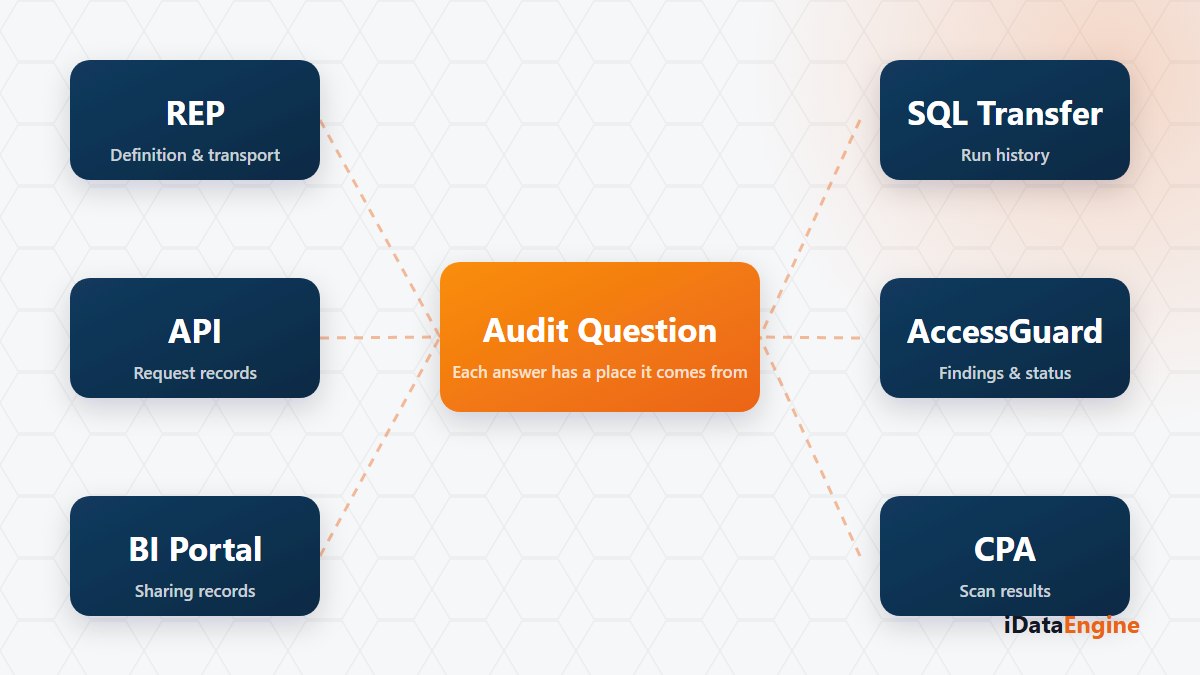
What makes preparation easier is therefore not a tool but a mapping: which question is answered by which module’s records?
Where the access question is evidenced
“Who holds which critical access?” is answered on the AccessGuard side: synchronized user, role, profile and authorization data; findings produced against critical access and segregation of duties rules; the finding state — open, accepted risk, mitigated or false positive — and the mitigation note and risk owner recorded on it.
One detail strengthens that picture. Because two scan results can be compared, new, remediated, still-open and accepted findings appear separately. That is exactly the evidence answering “what changed between last period and this one?”
“Who can see this report?” draws on two places: the authorization object mapping on report fields, and the folder, view, object and data authorizations on the BI side.
Which record stays when data leaves
“How did this data get out?” depends on the flow. Outbound API services hold request and response records, durations and error details. Transfer projects store run history, row counts and package information. On the mail side there is dispatch history with a recipient summary; on the file side, file operation records.
“When did this definition change?” is served by change audit records and application logs. For anything generated into SAP, the transport request builds a separate evidence chain: which code, with which request, activated in which system.
There is a chain on the code quality side too: CPA snapshots and finding comparisons show which findings a development moved through in which period. What answers the auditor’s “is the process working?” is that comparison rather than any single report.
One question leaves the product records behind: who authorized it? The product shows when and what was opened; recording why is your job. The most practical way to close that gap is writing the reason next to the finding as you grant the access.
The link between evidence and retention
The invisible limit on any evidence list is retention. Request and log records older than a given date can be cleaned up in a controlled way, and a cleanup window shorter than your audit cycle produces questions you cannot answer. Aligning that setting with your audit calendar is a correction you cannot make afterwards.
Accept one boundary from the start: the existence of these records is not a compliance certification. What helps in an audit is traceability rather than a claim — being able to show where each decision sits.
The best preparation before your next audit is a rehearsal: take three questions from the last one and measure how long finding the evidence takes. We can run that rehearsal with your own questions, and the mapping table that comes out of it stays useful long after the audit day.