Developing a list report in SAP involves more than reading a few tables. Source objects, joins, filters, the selection screen and the ALV output have to be designed together. When that information exists only inside ABAP code, every change begins by reconstructing the design from the source.
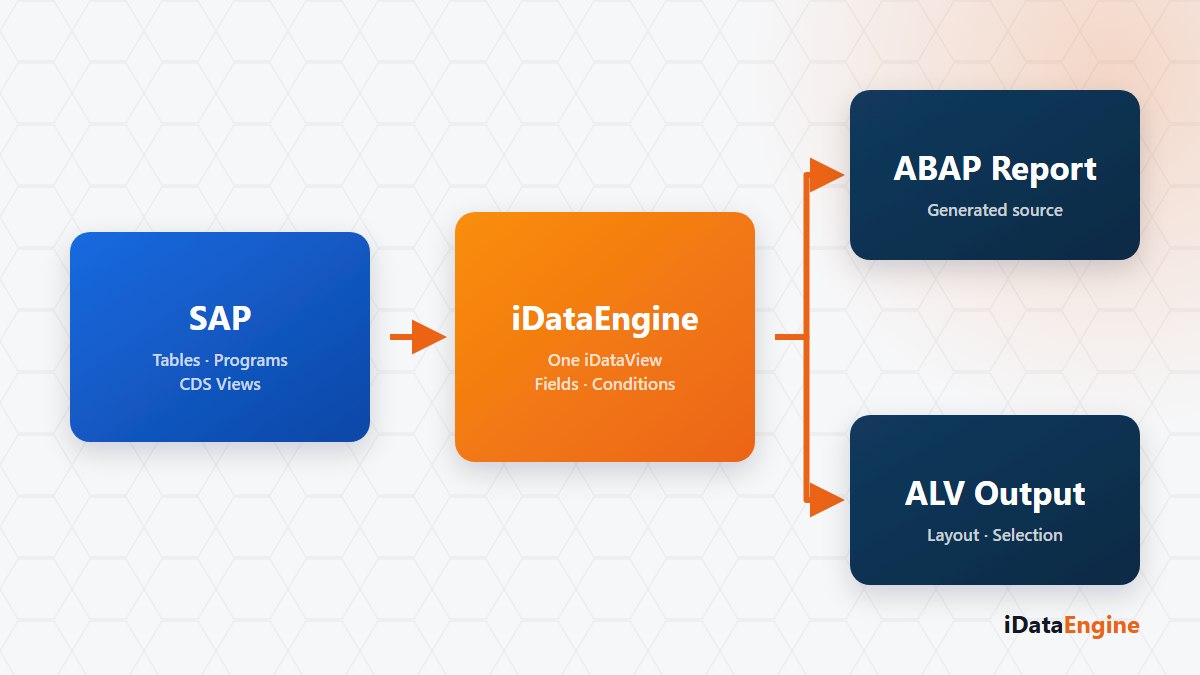
An iDataView in the REP module keeps the report structure as a separate, editable definition. The user defines the source, fields and behaviour in the designer; iDataEngine generates ABAP source code and a text pool that can be saved and activated in SAP.
What an iDataView definition contains
A source can be an SAP table, program, transaction, function or another active iDataView. Multiple sources can be related through joins and field mappings. Conditions can use include and exclude rules, low and high values, dynamic dates and reference fields.
Visibility, sorting, aggregation, conversion and reference properties are managed at field level. The same definition identifies which fields appear on the selection screen, whether they are mandatory, whether they have default values, and whether they accept ranges or multiple selections. ALV columns, texts, sorting and summary behaviour are generated from this metadata.
Moving from a definition to an active SAP report
When the iDataView is saved, generator components build the data declarations, selection screen, data reading, transformation, authorization and ALV blocks. The generated source is sent through a transport request to the save and activation flow in the target SAP system. Transport management and activation remain standard SAP responsibilities.
Separate active and passive versions allow a change to be prepared without directly altering the working definition. Definitions can be copied, imported or exported. Once active, an iDataView can also be reused as a source for API, SQL Transfer, BI, mail variants and Fiori export.
Checks to complete before release
- Joins: Confirm that the join structure does not multiply rows unexpectedly.
- Data types: Test dates, quantities, currencies and reference fields with representative data.
- Selection screen: Test mandatory fields, ranges, multiple selections and default values separately.
- ALV output: Check column texts, sorting, totals and user authorizations in the target SAP system.
REP is not a replacement for a general-purpose ABAP development environment. Special business rules, complex calculations, customer code and performance work may still require a developer. The generated report is only as accurate as the iDataView definition and the SAP metadata behind it.
A practical evaluation can start with one existing report requirement: identify the source object, expected selection fields and ALV columns. An example iDataView can then be prepared and the generated ABAP report verified in a test system.